Digital Marketing

Jun 9, 2011

What Is Google Analytics Intelligence

Google has added a new module to Google Analytics called Intelligence. The currently in beta module displays custom and automatic alerts that are created from website traffic operations. It is not sure yet if all Google Analytics users have access to this new module of the website traffic analysis service yet or if it has been made available to select users only.

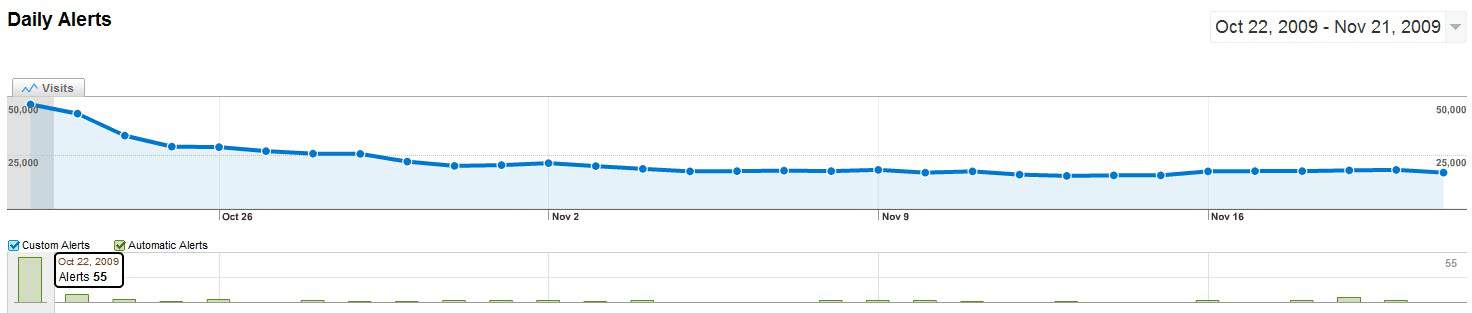
Google Analytics users who can access it will find a display of their website’s traffic graph along with another bar below that is showing the alerts for the corresponding days. Alerts are color coded with automatic alerts using a light green and custom alerts a light blue color. There will only be automatic alerts in the beginning.

google analytics intelligence
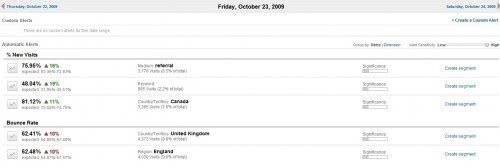
The automatic alerts will give a webmaster immediate information about traffic jumps. This includes major traffic changes to certain pages on the website, a change in a page’s bounce rate, pageviews or a higher or lower than usual visitor stream from a specific country, state or region.
google_analytics

This gives the webmaster a quick overview of traffic developments on a specific web project or website. There are certain possibilities where Google Analytics Intelligence module can help. Webmasters could for instance investigate traffic increases or decreases more effectively as it will for instance display a decrease in traffic to a very popular page on the website. The webmaster could then analyze the issue further.

It is furthermore possible to create custom alerts and this could be very interesting to some webmasters. Custom alerts are created from a list of available alert conditions. The webmaster selects a traffic type to be monitored. This can be all traffic, traffic from a campaign, keyword, medium and landing or exit page. This traffic type is then combined with a metric that is triggering the alert. This again can be pageviews, total visitors, revenue or pre-defined goals. The selected metric is then given a threshold value. An alert is then automatically created whenever that value is crossed.

Another interesting option is to look at weekly or monthly reports which even gives a better overview as day to day variations are something that every webmaster has to live with. Google Analytics Intelligence is available in the left sidebar menu of the Google Analytics account.

Apr 27, 2011

Not all backlinks are displayed by Google

Link building is a very important aspect of SEO and it is useful to check that Google and other search engines have indexed any links you have built. Since search engines crawl the web at different rates, a particular link may be picked up by one search engine but not the other.

Most search engines have a ‘cached’ link under each search result that will show you the latest version of the page as seen by the search engine with a time and date of the last cache. This is useful in figuring out whether your link has been seen by the search engine.

Some search engines, such as Google, will only reveal a fraction of the backlinks it has indexed in an effort to combat manipulation of rankings via links. This makes it hard to get a complete picture of your site’s backlinks from Google’s point of view. Instead, other backlink checkers such as Yahoo SiteExplorer are used to estimate backlinks indexed by Google.

In summary, just because you can’t find a link in a backlink checker doesn’t mean it hasn’t been indexed. Also keep in mind that from an SEO perspective, both the quality and quantity of links are important, and link building is just one facet of any good SEO campaign. So use a backlink checker to get a sense of where your website stand against your competitors, rather than let it drive your campaign.

Mar 11, 2011

Google Enter Tsunami Warn

The Tsunami That swept large parts of Japan, the spotlight citizens of the world today. Google Also disseminate tsunami warnings Participate That predicted visited other countries, Including Indonesia.

The Google search page displaying a warning inscription below the typing box keyword.

"Tsunami Alert for New Zealand, the Philiphines, Indonesia, Papua New Guinea, Hawaii and others. Waves Few expected over the next hours, the caused by the 8.9 earthquake in Japan, "Read the warning.

But these warnings cans only be seen on Google.com, the Bahasa Indonesia. While on Google.co.id, Indonesian insisted 'there is no text.

Previously, Climatology Meteorology and Geophysics Agency (BMKG) Also delivered a similar warning, one of Them via the official Twitter account BMKG. Mentioned That the the caused major tsunamis Earthquakes in Japan is expected to spread to North Sulawesi, North Maluku and Papua, around 18:00 local time.

Of course, Such warnings are not intended to make a panic or even frighten, but to raise awareness of residents in these areas.

Japan Live Earthquake & Tsunami Coverage From CNN International

Japan Live Earthquake & Tsunami 

Japan Live Earthquake & Tsunami Coverage From CNN International

Mar 1, 2011

Control Your Snippets in Google Search Results

Where does Google retrieve snippets from?

Google retrieves snippets from three different locations, namely: (i) META Description, (ii) Page content, and (iii) Open Directory Project (ODP). It is up to Google to choose what they think is the most relevant to the search query.

Can we control search snippets?

Yes, below are some ways of controlling them.

• Avoid duplicate title tags and META Descriptions. Having multiple pages with duplicate title and META Description can result to Google’s ranking of wrong pages or filtering of the desired META Description.

• Optimise your META Description. Make sure that it is relevant to the page and appears to be convincing to the target audiences or users and including the target keywords on it is helpful to your SEO.

• Block ODP Listings. If Google displays a different snippet and if you think it came from Open Directory Project then there is a META tag you can use in order to block Google from using the ODP listing. The META tag is: META Name="Robots" CONTENT="NOODP"

• If ever you want to block your snippet entirely for some reasons then this is the META tag to use: meta NAME="GOOGLEBOT" CONTENT="NOsnippet"

This should be done with CAUTION as this will entirely remove your snippet in search results.

Feb 24, 2011

Changes in Google Algorithm To Push Low-Quality Sites

Google said Thursday that it had made a major change to its algorithm in an effort to improve the rankings of high-quality Web sites in its search results — and to reduce the visibility of low-quality sites. While the company did not say so explicitly, the change appears to be directed in part at so-called content farms like eHow and Answerbag, which generate articles based on popular search queries so they will rise to the top of the rankings and attract clicks.

Google has been facing criticism from some users for allowing articles that aren’t useful to appear prominently in search results. That has now changed, according to the company.

“This update is designed to reduce rankings for low-quality sites — sites which are low-value add for users, copy content from other Web sites or sites that are just not very useful,” Amit Singhal, a Google fellow, and Matt Cutts, head of the spam-fighting team, wrote in a company blog post. “At the same time, it will provide better rankings for high-quality sites — sites with original content and information such as research, in-depth reports, thoughtful analysis and so on.”


Google has said that it makes about 500 changes to its algorithm a year, but most are so small that the company doesn’t announce them. This one will affect 11.8 percent of search queries, Google said, so it is big enough to significantly change the results that people see.

Google’s announcement did not mention content farms. But Mr. Cutts has spoken in recent weeks about the problem and said Google was working on algorithm changes to fix it. “In general, there are some content farms that I think it would be fair to call spam, in the sense that the quality is so low-quality that people complain,” he said in a recent interview.

While the content on these sites can be useful, much of it is closer in value to the eHow article on making friends in college, which includes tips like “consider joining a sorority or fraternity” and “remember to have a good time, smile and laugh.” Many of the articles on these sites are phrased as how-tos, and even after Thursday’s change they still show up as top results in searches for how to do something — but if someone phrases a search query that way, they might want to read such an article. In the blog post, Google said the updated algorithm rewards high-quality sites, so the effect will become clear over time.

Last week, Google introduced an extension to the Chrome browser that people can use to block certain sites, and said it would study which sites people block to figure out which ones bother users. On Thursday, Google said that it did not use this data to change the algorithm, but that the new algorithm caught 84 percent of the most-blocked Web sites.

Feb 20, 2011

Top On-Page Optimization Factors

The most important part of search engine optimization is fine tuning of on page factors. Below are some of the top on page search engine optimization factors which cannot be ignored. Do check if you are missing something while optimizing your web pages:

1. Page Title Element
2. Page Name (url)
3. Keyword prominence
4. Keyword proximity
5. Keyword density
6. Location of Keywords on the Page (beginning to end, keywords in links, location of keywords in paragraph, footer, sidebar, header etc)
7. Number of occurrences of keyword
8. Heading Tags (h1-h3)
9. Text Type (bold, italic)
10. Links(Anchor text, location of links(header/footer..), title tag, inbound links, outbound links)
11. Images(file name, title element, alt attribute, location of image in the page, links on image)
12. Number of words in a page
13. Page layout (css errors, html errors, xhtml compliant)
14. Meta Tags (description, keywords, robots, content type)
15. Lower and Upper case letters in words
16. Use of stop words
17. Comment tags

Kishore SEO - Latest SEO Updates and Online SEO Training ©2008.

TOP